
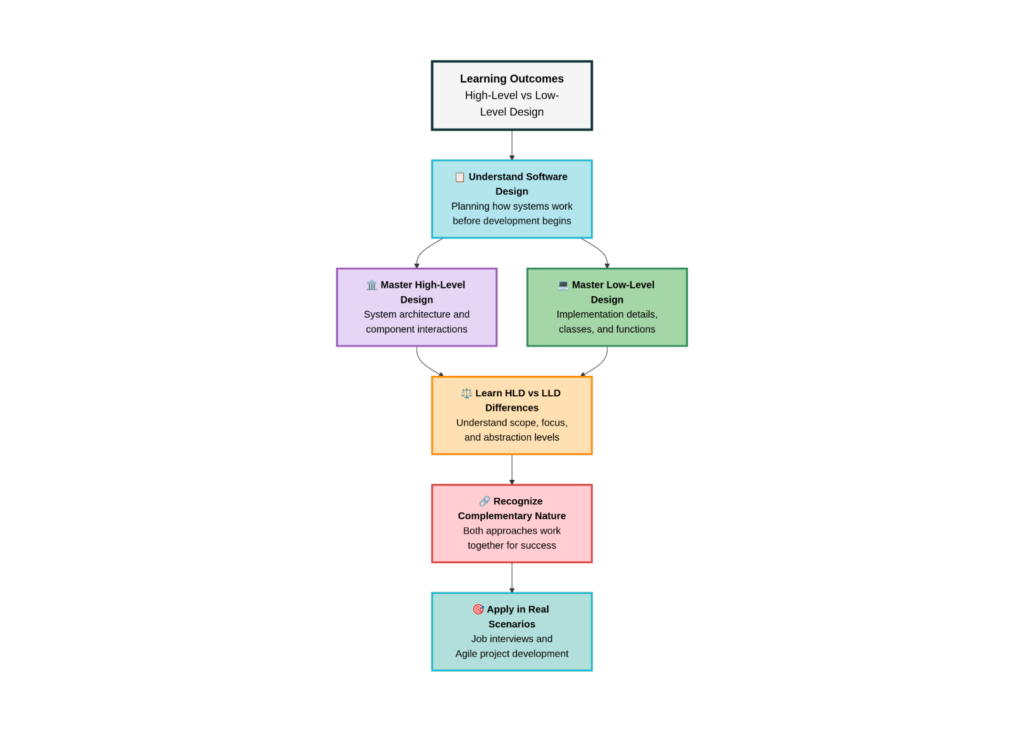
Key Learning Outcomes from High-Level and Low-Level Design Blog
When building any software system, whether it’s a simple mobile app or a large enterprise platform, design plays a critical role in determining success. Poor design leads to confusion, rework, bugs, scalability issues, and unhappy users. Good design, on the other hand, creates clarity, stability, and confidence for developers and stakeholders alike.
In software engineering, design is usually divided into two major stages:
- High-Level Design (HLD)
- Low-Level Design (LLD)
Many beginners, and even experienced developers, often ask:
- What are high-level design and low-level design?
- What is the difference between high-level and low-level design?
- When should I use HLD vs LLD?
This blog will answer all those questions very simply, with real-life and technical examples. By the end of this blog, you will clearly understand high-level and low-level design, their differences, importance, and how they are used in real projects.
What Is Software Design?
Before understanding what high-level design and low-level design are, it is important to know what software design actually means. Software design is the process of planning how a system will work before development begins. It defines how different parts of the system will interact, how data will flow, and how the system will handle growth and changes in the future.
Think of software design like planning a building. You don’t start construction without a plan. First, you decide how many floors the building will have, where the rooms will be, how electricity and water will flow, and only then do you move to construction details. Software design works in the same way. This planning is done at two levels:
- High-Level Design
- Low-Level Design
Together, they form the backbone of any well-structured software system.
What Is High-Level Design (HLD)?
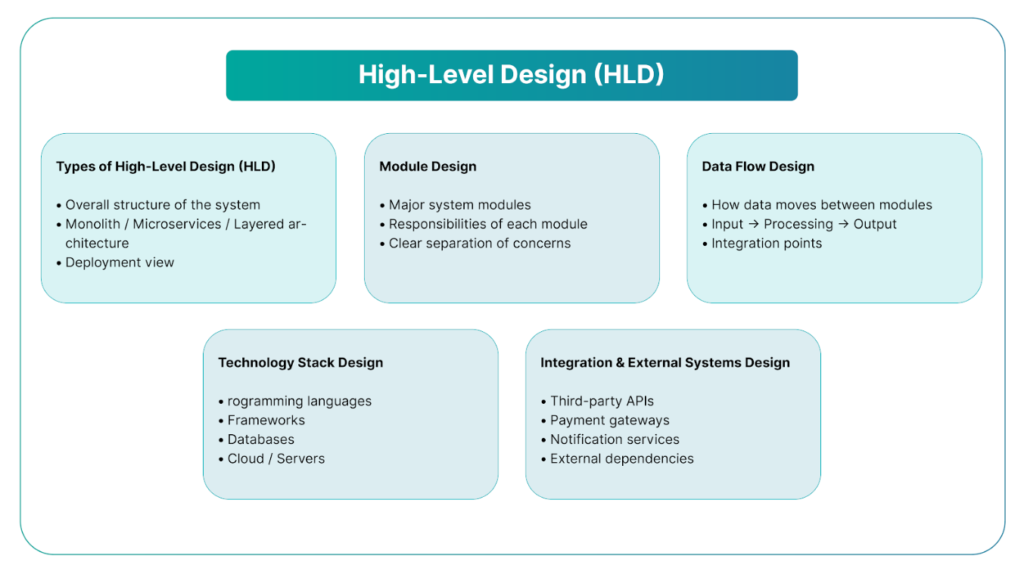
High-Level Design (HLD) focuses on the overall structure of the system. It explains what the system is made of and how the major components interact with each other.
In simple terms, high-level design gives a bird’s-eye view of the entire system. It does not go into coding or implementation details. Instead, it provides a clear picture of the system’s architecture so everyone involved understands how the system is supposed to work.
High-level design is usually created in the early stages of a project and is used to communicate ideas between architects, developers, managers, and stakeholders.
What Does High-Level Design Describe?
High-level design typically describes the following areas:
- The main modules or components of the system
- How these components communicate with each other
- External systems such as third-party services or APIs
- High-level data flow between components
- Overall technology choices (databases, servers, frameworks)
Instead of explaining how something is coded, HLD explains how things are connected.
High-Level Design Example
Imagine an online shopping app where people can browse and buy products. At a high level, this system includes several important parts:
- User Interface: This is what shoppers see on their screens, whether they’re using a computer or a mobile phone.
- Product Catalogue Service: This part helps organize and display all the products available for sale, making it easy for users to find what they want.
- Order Management System: Once someone decides to buy something, this system takes care of processing their order and keeping track of it.
- Payment Gateway: This is the secure system that handles payments, making sure that transactions are safe and straightforward.
- Database: This acts as a storage space for all the information about products, orders, and customers.
- Notification Service: This component sends out messages to users, such as order confirmations or special offers.
At this stage, we’re focusing on how these different parts of the app connect and work together, rather than on the specific coding details.
Real-Life Analogy for High-Level Design
High-level design is like a city map. It shows highways, zones, and main roads. You can understand how to move from one place to another, but you won’t see house numbers or interior layouts.
What Is Low-Level Design (LLD)?
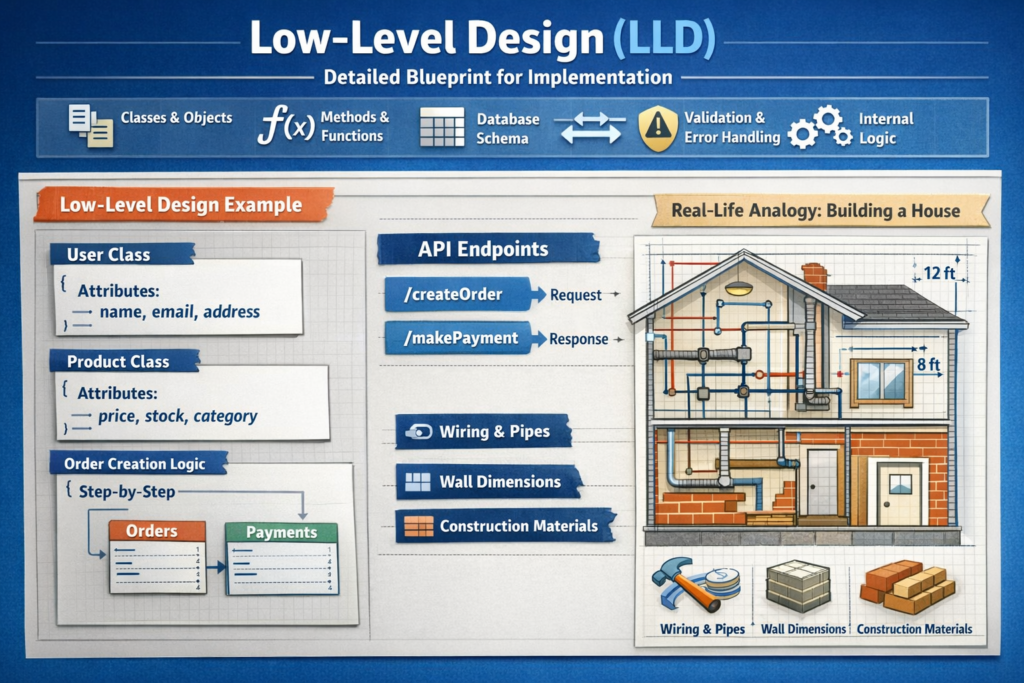
Low-Level Design (LLD) focuses on the internal details of each component described in the high-level design. It explains how the system will actually be implemented.
While HLD answers what, LLD answers how.
Low-level design is created by developers to ensure that coding is consistent, logical, and easy to maintain. It acts as a detailed blueprint that developers follow while writing actual code.
What Does Low-Level Design Include?
Low-level design focuses on the finer details that help make a project work smoothly. It involves specific aspects such as:
- The different building blocks of the software, like classes and objects
- The various functions that perform tasks within the software
- How data is organized and related in databases
- The structure of communications between different parts of the software, like how information is sent and received
- The rules for checking data for accuracy and handling any mistakes
- The internal processes and flows that guide how the software operates
These details are essential to ensure that everyone involved in the project understands what needs to be done, making the development process clearer and more efficient.
Low-Level Design Example
As we build our online shopping application, we focus on the detailed design of the system. This involves creating a User class, which includes important information like the customer's name, email, and address. There’s also a Product class that holds details about items for sale, including their price, available stock, and category.
We'll outline the process of creating an order step by step, explaining how customers will place their orders. Additionally, we need to establish how our database will store information about orders and payments.
Finally, we’ll identify specific web addresses, known as API endpoints, that will allow the application to perform actions like creating an order or processing a payment. These steps are crucial as they guide the actual coding and development of the application.
Real-Life Analogy for Low-Level Design
Low-level design is like the construction blueprint of a house. It shows wiring, pipeline placement, wall dimensions, and materials. Builders use this exact plan to construct the house.
High-Level Design and Low-Level Design Working Together
High-level design and low-level design work hand in hand; they are not isolated steps in the process. High-level design sets the overall framework and vision for a project, giving it direction and organization. In contrast, low-level design focuses on the finer details needed to transform that framework into a functional product.
Without high-level design, the project can feel aimless or unclear, lacking a strong vision of what it should be. On the other hand, without low-level design, the project may miss critical details, which could lead to issues in how it operates.
Successful projects recognize the importance of both high-level and low-level design, ensuring that they have both a clear vision and the precise details necessary to bring that vision to life.
Difference Between High-Level and Low-Level Design
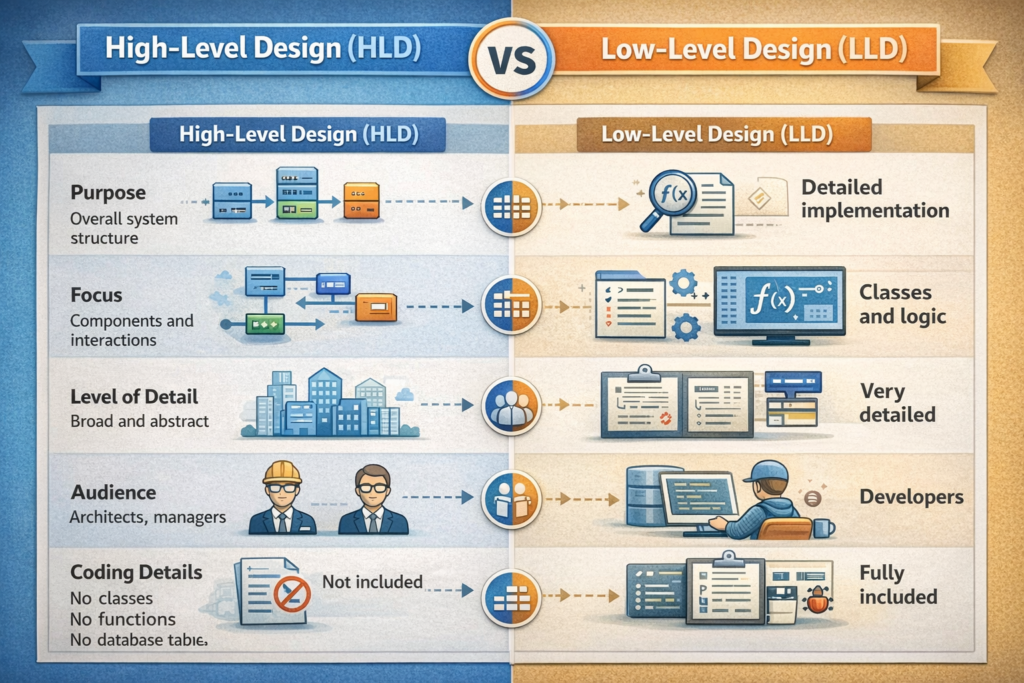
Understanding the difference between high-level design and low-level design is one of the most important concepts in software engineering.
High-level design focuses on architecture and system flow, while low-level design focuses on implementation details. HLD is abstract, whereas LLD is concrete.
Why High-Level Design Is Important?
High-level design is like making a detailed blueprint for a building before construction starts. It helps everyone involved, from architects to business leaders, understand how the system will work. With a solid plan in place, teams can:
- Prevent big mistakes in the structure
- Communicate better among themselves
- Make updates and improvements easier in the future
- Avoid expensive redesigns later on
If teams skip this important planning step, it can lead to confusion and unstable systems that don’t work well. In short, taking the time to create a high-level design helps ensure the project runs smoothly and meets its goals.
Why Low-Level Design Is Important
Low-level design is a crucial step for developers, as it provides clear guidelines on how to build software features. By having a solid low-level design in place, the development process becomes quicker and more efficient. It also helps to minimize errors, making the code more reliable. Additionally, a good design makes it easier to test and fix issues when they arise, and it simplifies future updates or changes.
Without low-level design, different developers might create the same feature in various ways, leading to confusion and inconsistency in the code. In short, low-level design helps ensure that everyone is on the same page, which results in better overall software quality.
High-Level and Low-Level Design in Interviews
In job interviews, candidates are often asked to explain a couple of key concepts related to system design:
- High-Level Design (HLD): This refers to the overall structure and architecture of a system. It provides a big-picture view of how the system is organized and how different components interact with each other.
- Low-Level Design (LLD): This focuses on the details of specific parts of the system. It involves describing how individual components work, including the specifics of their functionality and how they communicate.
- Difference between HLD and LLD: The main difference is that high-level design looks at the system from a broad perspective, while low-level design zooms in on the finer details.
When asked to design a system, the best approach is to start with high-level design. This helps explain the overall architecture before delving into the low-level design for one or two specific components. This way, it becomes easier for others to understand the framework before getting into the intricate details.
High-Level and Low-Level Design in Agile Projects
In Agile development, both big-picture planning and detailed design play crucial roles.
- Big-picture planning gives the team initial guidance on what the project will look like.
- Detailed design develops and changes with each work cycle, also known as a sprint.
The designs in Agile are adaptable and get better over time. So, rather than eliminating the design process, Agile makes it more flexible and ongoing.
Conclusion
Grasping the concepts of high-level and low-level design is key to becoming a better software developer. Not only can it improve your skills, but it can also help you stand out in job interviews and advance in your career. When you have a solid understanding of these design principles, you'll find yourself better equipped to tackle real-world challenges in software development.