Embedded systems are small computers made to do specific tasks inside bigger devices. They are faster and more reliable than normal computers. This article gives a simple introduction to embedded Linux. It starts with the basics of embedded systems, like hardware (microcontrollers) and software (firmware and real-time operating systems). Then, it explains the layers of embedded Linux: hardware, bootloader, kernel, root filesystem, and applications. You will also learn about important concepts like cross-compilation, device trees, and the U-Boot bootloader. This embedded Linux tutorial shows how to set up a development environment, customize the kernel, build a root filesystem, and debug problems. It also covers advanced topics like real-time use, power saving, security, and IoT connection. This makes it a helpful starting point for beginners who want to learn embedded Linux development.
Understanding Embedded Systems Basics
Before delving into the embedded Linux tutorial, we should first know what an embedded system is. An embedded system is a small computer made to do one main job inside a bigger device. Unlike normal computers that can run many apps, an embedded system is built to do only specific tasks. It does these tasks quickly and reliably.
An embedded system has both hardware (the physical parts) and software (the programs). They work together to control certain functions. These systems are called "embedded" because they are hidden inside bigger machines or devices. Most of the time, users don’t even notice them.
Core Components of Embedded Systems
Every embedded system consists of three essential components that work in harmony. In this Linux embedded systems tutorial, the following are:
Hardware Components
The hardware of an embedded system starts with a microprocessor or a microcontroller. This is the "brain" of the system. Today, most systems use microcontrollers because they have everything in one chip. Like CPU, memory, and connections. Such chips are often called System-on-Chip (SoC).
Other important parts include:
- Memory: RAM for temporary data, and ROM/Flash for storing programs.
- Input/Output (I/O) interfaces: to connect sensors, motors, and communication ports.
- Timers and interrupt controllers: to handle time as well as events correctly.
- Power supply circuits: to give the right amount of energy to the system.
Software and Firmware
The software is the set of programs that give the system its functions. This software is stored in ROM or Flash memory, so it does not get erased. When software is stored in the hardware, it is called firmware. Firmware must run with very little memory, low power, and limited speed.
Real-Time Operating System (RTOS)
Some embedded systems use a Real-Time Operating System (RTOS). An RTOS helps manage tasks, share resources, and keep track of time.
In fact, smaller systems may not need an RTOS. They can run their program directly on the hardware.
Architecture of Embedded Linux Systems
The embedded Linux tutorial systems explain how this operating system is organized to function effectively. Generally, it involves different layers, each playing a vital role in making the system work smoothly.

1. Hardware Layer
At the bottom is the hardware. This includes the processor (the brain), memory (data storage), and devices like sensors or screens. The type of hardware decides how Linux will be set up as well as which features will be used.
2. Bootloader
On top of the hardware is the bootloader. It starts the system and loads Linux into memory. A common bootloader is U-Boot.
The bootloader:
- Prepares memory and hardware.
- Loads Linux from storage into memory.
- Give setup details to Linux.
- Allows updates or recovery if something goes wrong.
3. Linux Kernel
The kernel is the core of Linux. It controls resources and helps programs run. In embedded systems, the kernel is often made smaller to fit the device. The kernel:
- Manages programs and memory.
- Handles device drivers (software that talks to hardware).
- Supports file systems (to save and organize data).
- Manages network connections.
- Let's applications talk to each other.
4. Root Filesystem
The root filesystem has all the tools as well as files the system needs. It includes:
- /bin → program files
- /etc → settings
- /lib → libraries
- /sbin → system tools
Together, these parts let users work with the system smoothly.
Applications and Services
At the top layer are the custom applications and services that provide the embedded system's primary functionality. These applications interact with the kernel through system calls and utilize the libraries provided in the root filesystem, forming an essential part of any embedded Linux tutorial for beginners by demonstrating how user applications communicate with the underlying system.
Essential Components Deep Dive
Cross-Compilation Toolchain
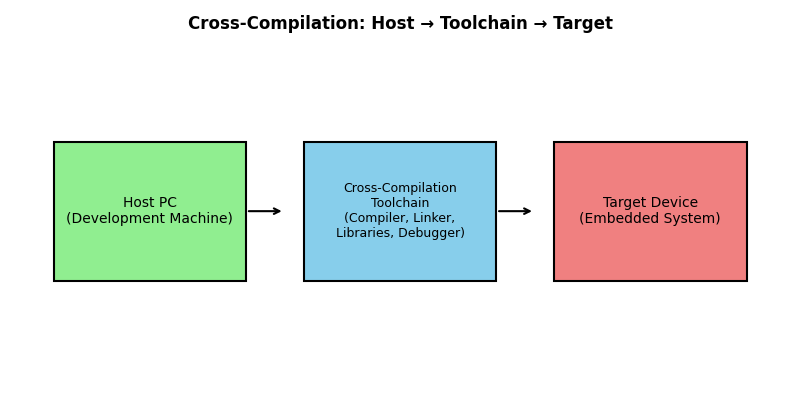
In embedded Linux, programs are often not built directly on the device. This is because embedded devices are usually small and not very powerful. Instead, the programs are built on a stronger computer (called the host) and then sent to the embedded device (called the target). This process is called cross-compilation.
Toolchain for Cross-Compilation
A cross-compilation toolchain usually has:
- A cross-compiler (like GCC made for the target device’s CPU).
- A cross-linker and assembler.
- Target libraries (such as glibc, musl, or uClibc).
- Debugging tools designed for cross-development.
Setup
To use cross-compilation, we must set environment variables and make sure the toolchain can create programs for the target processor.
Device Trees
Device trees are hierarchical data structures that describe hardware configuration to the Linux kernel. This mechanism allows the same kernel to work with different hardware configurations without recompilation.
Device tree files use a standardized format with:
- Nodes representing hardware devices
- Properties describing device characteristics
- Hierarchical organization reflecting system topology
The bootloader loads the device tree blob (DTB) into memory and passes it to the kernel during boot.
U-Boot Bootloader
U-Boot (Universal Bootloader) is the most widely used bootloader in embedded Linux systems. It provides a flexible boot environment that can:
- Boot from various storage media (SD cards, eMMC, NAND flash, network)
- Provide an interactive command-line interface for debugging
- Support multiple boot methods and fallback options
- Handle device tree loading and kernel parameter passing
U-Boot is typically built in two stages: a first-stage loader (SPL) that initializes basic hardware, and a second-stage loader that provides full functionality.
Getting Started with Embedded Linux Development
Setting Up Development Environment
To begin the embedded Linux tutorial, you'll need a proper development environment. Most embedded Linux development is performed on Linux host systems, as this provides the best compatibility with build tools and cross-compilation environments.
Essential tools include:
- Linux development machine (Ubuntu, Fedora, or similar)
- Cross-compilation toolchain for your target architecture
- Build systems like Buildroot or Yocto Project
- Hardware debugging tools (JTAG debuggers, serial consoles)
- Version control systems (Git)
Choosing Hardware Platform
For beginners, it's recommended to start with well-supported development boards that have extensive documentation and community support. Popular choices include:
- Raspberry Pi boards for ARM architecture learning
- BeagleBone boards for industrial applications
- STM32 discovery boards for microcontroller-class devices
- NXP and TI evaluation boards for commercial development
Building Your First System
The process of building an embedded Linux system involves several steps:
- Select and configure the bootloader for your hardware platform
- Configure and compile the Linux kernel with appropriate drivers and features
- the Create the root filesystem with the necessary libraries and applications
- Prepare boot media and flash the complete system
Modern build systems like Buildroot automate much of this process, making it easier for beginners to create working systems.
Kernel Configuration and Customization
Kernel configuration is a critical step in embedded Linux development. The configuration process determines which features are included in the kernel, directly affecting system size, performance, and functionality.
Configuration Tools
Several tools are available for kernel configuration:
- make menuconfig: Text-based menu system using ncurses library
- make xconfig: Graphical configuration using Qt toolkit
- make gconfig: Alternative graphical interface using GTK
- make config: Basic text-based sequential configuration
Key Configuration Areas
Important configuration areas for embedded systems include:
- Architecture Selection: Choose the target CPU architecture (ARM, x86, MIPS, etc.)
- Device Drivers: Enable drivers for hardware components present on your system
- Filesystem Support: Select filesystem types needed for your storage devices
- Networking Options: Configure network protocols and features
- Power Management: Enable power-saving features for battery-powered devices
- Security Features: Configure security modules and access controls
Optimization Strategies
For embedded systems, kernel optimization focuses on:
- Removing unnecessary features to reduce the memory footprint
- Enabling specific optimizations for the target architecture
- Configuring appropriate scheduling and memory management
- Selecting minimal feature sets while maintaining required functionality
Root Filesystem Creation
The root filesystem provides the user-space environment for embedded Linux systems. Creating an appropriate root filesystem requires understanding the directory structure and essential components needed for system operation.
Essential Directories
A minimal root filesystem requires several standard directories:
- /bin: Essential user binaries and commands
- /sbin: System administration binaries
- /lib: Shared libraries required by binaries
- /etc: Configuration files and scripts
- /dev: Device files for hardware access
- /proc: Virtual filesystem for kernel information
- /tmp: Temporary files with appropriate permissions
Filesystem Creation Methods
Several approaches exist for creating root filesystems:
- Manual Creation: Building the filesystem directory by directory, copying necessary files
- Build Systems: Using tools like Buildroot or Yocto to automate filesystem generation
- Base Images: Starting with existing minimal distributions and customizing
Library Dependencies
Embedded systems must include all necessary shared libraries. Dynamic linking reduces memory usage when multiple programs share libraries, while static linking eliminates runtime dependencies but increases binary size.
Advanced Topics
Real-Time Capabilities
Some embedded devices need to respond to events very quickly, in a guaranteed time. Regular Linux is not fully real-time, but we can make it better:
- PREEMPT_RT Patch: Changes Linux to respond faster to events.
- Dual-Kernel Systems: Like Xenomai, run a real-time kernel alongside Linux.
- Real-Time Scheduling: Set special rules so important tasks run on time.
Power Management
Embedded devices, especially those using batteries, need to save power. Linux helps in a few ways:
- DVFS (Dynamic Voltage and Frequency Scaling): Adjust the processor speed depending on the workload.
- Suspend/Resume: Put parts of the system to sleep to save energy.
- Runtime Power Management: Turn devices on and off as needed to save power.
Security Considerations
Embedded Linux devices often deal with sensitive data, so security is important:
- Secure Boot: Make sure only trusted programs can run.
- Access Controls: Give proper permissions to users and programs.
- Network Security: Protect communication over the network.
- Update Mechanisms: Make system updates safe and secure.
Development and Debugging in this Embedded Linux Tutorial
Debugging Tools and Techniques
To fix problems in embedded Linux, we use debugging tools:
- Serial Console: Use UART ports to see system messages.
- JTAG Debugging: Debug hardware, bootloader, and kernel issues.
- Remote Debugging: Debug the system over a network.
- Log Analysis: Use logs to watch and understand system behavior.
Integration with IoT
Modern embedded Linux systems often connect to IoT and cloud services. This includes:
- Communication: Use protocols like MQTT, HTTP, or CoAP.
- Data Management: Collect and send sensor data.
- Over-the-Air Updates (OTA): Update software remotely.
- Edge Computing: Process data on the device to reduce cloud use.
Best Practices
Good habits for success:
- Version Control: Use Git to track code and system changes.
- Automated Builds: Use continuous integration for reliable builds.
- Testing: Test hardware and software carefully.
- Documentation: Keep clear records of system design and settings.
Common Mistakes
Beginners often face these problems:
- Not planning enough memory (RAM/storage).
- Ignoring power-saving features.
- Forgetting about security.
- Not testing enough in different situations.
Performance Optimization
To make systems faster and efficient:
- Boot Time: Make startup shorter by tuning the kernel and filesystem.
- Memory Use: Save RAM by choosing light libraries.
- Storage: Use the right filesystem and compression.
- Network: Improve network settings for better speed.
Conclusion
This embedded Linux tutorial explained the basics and advanced ideas of embedded Linux. We learned about system architecture, real-time features, and power management. Embedded Linux is a strong and flexible platform for modern devices. To grow from beginner to advanced, you need hands-on practice with real hardware and projects. Success comes from knowing both the theory and solving real-world problems.
As technology grows with IoT, edge computing, and security needs, learning embedded Linux becomes even more important. Because Linux is open-source, it will always improve and have strong community support. Whether you are building factory systems, IoT devices, or home electronics, the lessons in this embedded Linux tutorial give you a solid start. Remember: embedded Linux development is a step-by-step process, and you get better with continuous learning and practice.