System design is about planning and building software systems that meet business needs and work well at scale. It helps ensure the system is fast, reliable, and able to grow. Whether you are preparing for interviews or building real applications. Learning system design basics is very important for every software engineer. This System Design tutorial covers simple ideas like scalability, the CAP theorem, and key parts such as load balancers and databases. You will also learn common design patterns, real examples, and best practices used in the industry. By the end, you will know how to build systems that support millions of users, make smart design choices, and avoid common mistakes.
1. Fundamentals of System Design: Core Concepts
Before diving into architectural patterns and components in this System Design tutorial, you need to understand the foundational principles that govern all scalable systems.
1.1 What is Scalability?
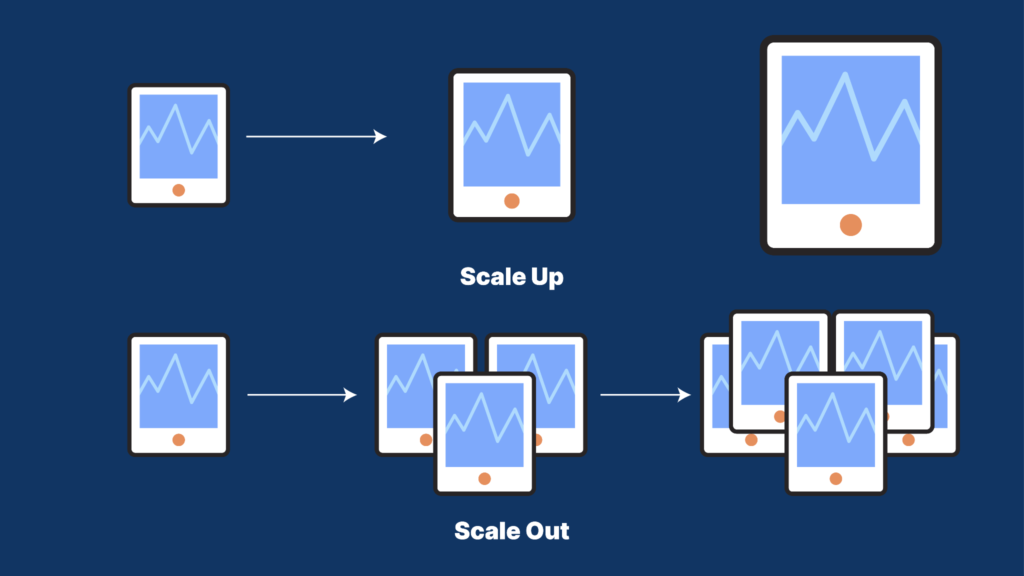
Scalability means a system can handle more users, more data, or more requests without becoming slow. For example, when your app grows from 100 users to 1 million users, it should still work smoothly. Scalability is not something you add later. It must be planned from the start. There are two main ways to scale a system:
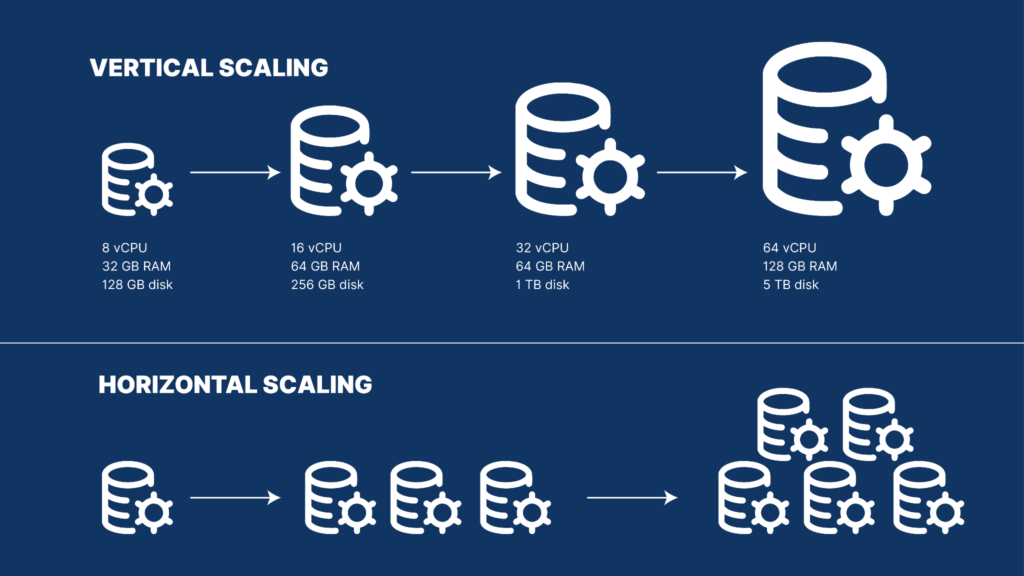
Vertical Scaling (Scale Up)
You increase the power of one machine
Add more CPU, RAM, or storage
Easy to do, but has limits
Servers cannot grow forever
Cost increases very fast
Example:Upgrading a server from 16GB RAM to 64GB RAM costs much more, but gives limited benefit.
Best for:Small apps with slow and predictable growth
Horizontal Scaling (Scale Out)
You add more machines
Load is shared between servers
Harder to build, but very powerful
Can scale almost without limit
Cost grows linearly
Big companies like Netflix, Google, and Amazon use this method.
Example:
If one server handles 1,000 requests/second, you can:
Upgrade the server (limited)
Add 10 servers + load balancer (better)
1.2 Availability and Reliability
Availability is a measure of how often a system is up and running, ready to respond to requests. It is usually described in percentages, often referred to as "nines". For example, 99% availability means the system could be down for about 87.6 hours each year. While 99.9% availability allows for around 8.7 hours of downtime, 99.99% means only about 52.6 minutes. The more "nines" you aim for, the more it can cost, which is why careful planning is important.
Reliability, on the other hand, is about how well a system can continue to work properly even when some of its parts fail. A reliable system usually has backup components, ways to switch to these backups automatically if something goes wrong, and methods to duplicate important data. This helps ensure that one small problem doesn't cause a larger system failure.
Key ideas to consider include:
Redundancy: Having extra important parts so that if one fails, the others can still keep things running.
Failover: A system that can automatically switch to a backup if the main system malfunctions.
High Availability (HA): Designing a system to minimize downtime by using multiple data centers, automatic recovery features, and real-time monitoring to keep everything functioning smoothly.
1.3 Latency and Throughput
Latency refers to the delay you experience between making a request and getting a response back. A quicker response time is better for the user experience, with the aim of keeping it under 100 milliseconds (ms) for web applications. If there's a delay longer than 100 ms. Then users are likely to notice it, and as the delay increases, it can hurt how engaged people feel and their likelihood of making a purchase.
On the other hand, throughput measures how many requests a system can handle in a given time frame, such as how many actions can be processed per second. For instance, a system might be able to deal with 1,000 requests every second, but if it takes 500 ms to respond. It won't work well for things that require real-time feedback, like live video streaming or trading stocks. Both latency (the speed of response) and throughput (the volume of requests handled) are important; you need a fast response and enough capacity to manage many requests at the same time.
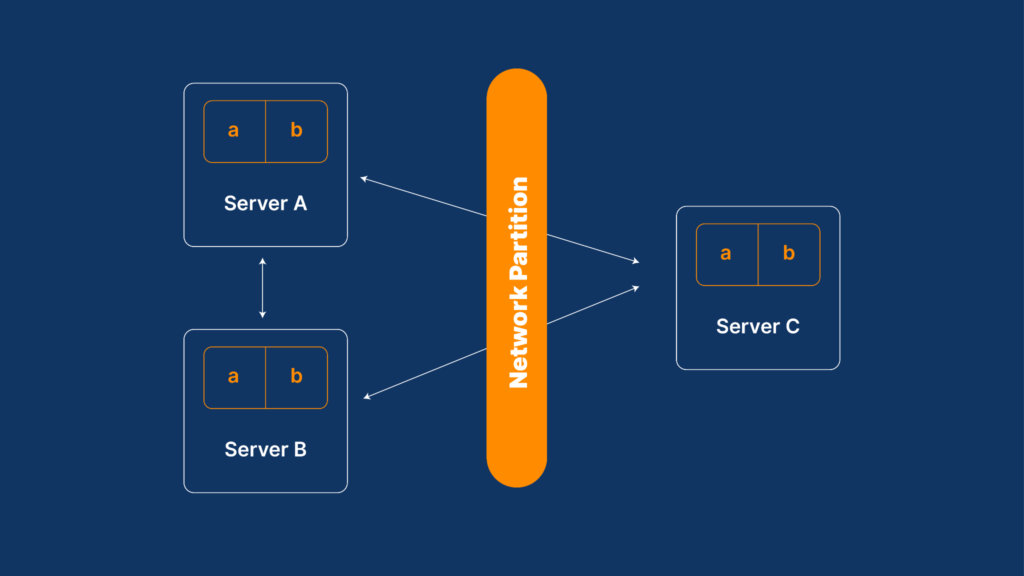
1.4 Understanding the CAP Theorem
The CAP Theorem, also called Brewer’s Theorem, explains a simple rule about distributed systems.
The rule
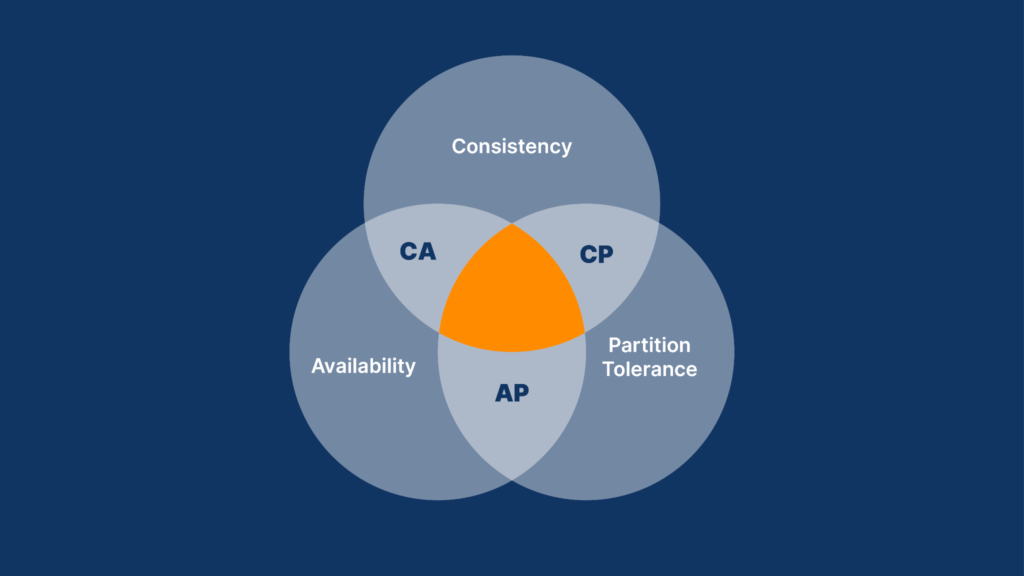
A distributed system can choose only two out of these three things at the same time:
1. Consistency (C)
All computers show the same data at the same time
You always get the latest value
Example: Bank balance must be correct
2. Availability (A)
The system always replies to your request
It may return old data, but it never says “no response”
Example: Social media apps always load something
3. Partition Tolerance (P)
The system keeps working even if the network breaks
Some computers may not talk to each other for a while
This is common when servers are in different locations
Why Partition Tolerance is necessary
In real life, networks fail
Cables break, servers crash, internet goes down
So, Partition Tolerance is always required
Types of systems
CP (Consistency + Partition Tolerance)
Data is always correct
System may become temporarily unavailable
Example: Banking systems
AP (Availability + Partition Tolerance)
System is always available
Data may be temporarily different
Data becomes correct later
Example: Social media feeds
CA (Consistency + Availability)
Data is correct and system is always available
Works only if the network never fails
Very rare in real distributed systems
2. Step-by-Step System Design Process
System design interviews and real-world projects follow a structured methodology that keeps you organized and prevents missing critical considerations.
Step 1: Clarify Requirements (10 minutes)
First, clearly understand what system you are building. Ask questions to remove confusion and agree on what success looks like.
Functional requirements explain what the system should do. These include things like user login, profile management, creating and reading data, and generating reports or analytics. These are the features users directly use.
Non-functional requirements explain how well the system should work. These include scalability (how many users or how much data it can handle), latency (how fast responses should be), availability (how often the system is up), throughput (how many requests it can handle per second), durability (data should not be lost), and consistency (whether data must always be perfectly up to date or can be slightly delayed).
Example (URL Shortener):The system should convert long URLs into short URLs and redirect users to the original link. It should support creating 1 million URLs per day, respond in less than 50 milliseconds, and stay available 99.99% of the time.
Step 2: Estimate Scale and Define Constraints
Next, estimate how big the system will be. This helps you choose the right architecture.
You should estimate daily active users, how many users are active at the same time, how many reads vs writes happen, how fast data grows, and how much storage is needed.
Example:If the system creates 1 million URLs every day, then in 10 years it will store about 3.65 billion URLs. If each URL needs 1KB of storage, the total storage will be around 3.65TB. This means the database must support sharding and replication.
Step 3: Define High-Level Architecture
Now, draw a simple high-level design. This shows how requests move through the system, without low-level details.
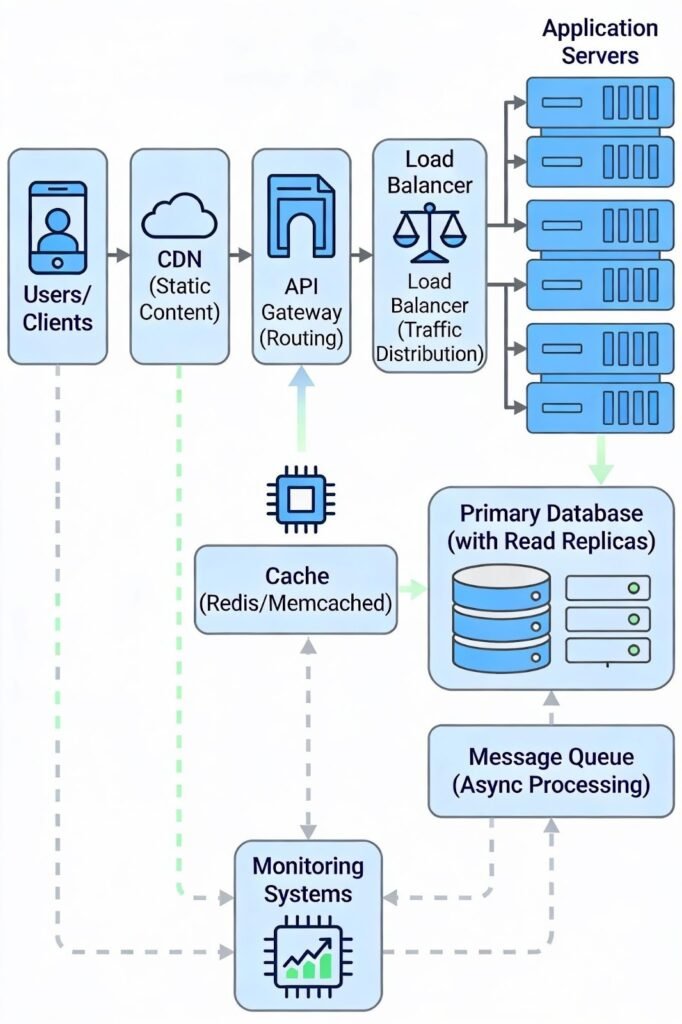
Common components include users (web or mobile apps), an API gateway for routing and authentication, load balancers to spread traffic, application servers for business logic, databases for storage, caches for fast access, message queues for background work, CDNs for static content, and monitoring tools to track system health.
Step 4: Identify Core Components and Responsibilities
Break the system into smaller parts, each with a clear job.
For example, one service handles user authentication, another stores and retrieves data, another manages caching, another runs background jobs, and another processes analytics. Clear responsibilities reduce complexity and allow each part to scale independently.
Step 5: Address Scalability, Reliability, and Performance
Find possible bottlenecks and plan how to fix them.
For scalability, use load balancers, caching, database sharding, and message queues.
For reliability, use database replication, failover systems, constant monitoring, and graceful degradation.
For performance, optimize database queries, use indexes, add caching, use CDNs, and reduce network calls.
Step 6: Evaluate Trade-Offs and Finalize Design
Every system design has trade-offs. You must clearly explain them.
Examples include choosing between strong consistency and eventual consistency, faster reads vs faster writes, using more storage to save computation time, or choosing simpler designs over complex ones. Explaining these choices shows strong engineering thinking.
3. Essential System Design Components
Modern systems combine these building blocks to achieve scalability and reliability.
3.1 Load Balancers
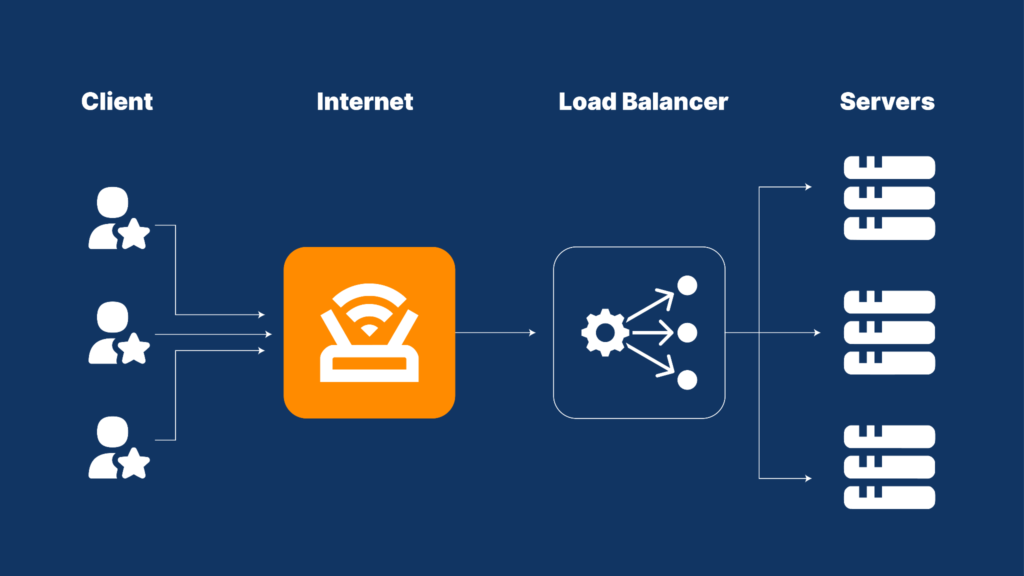
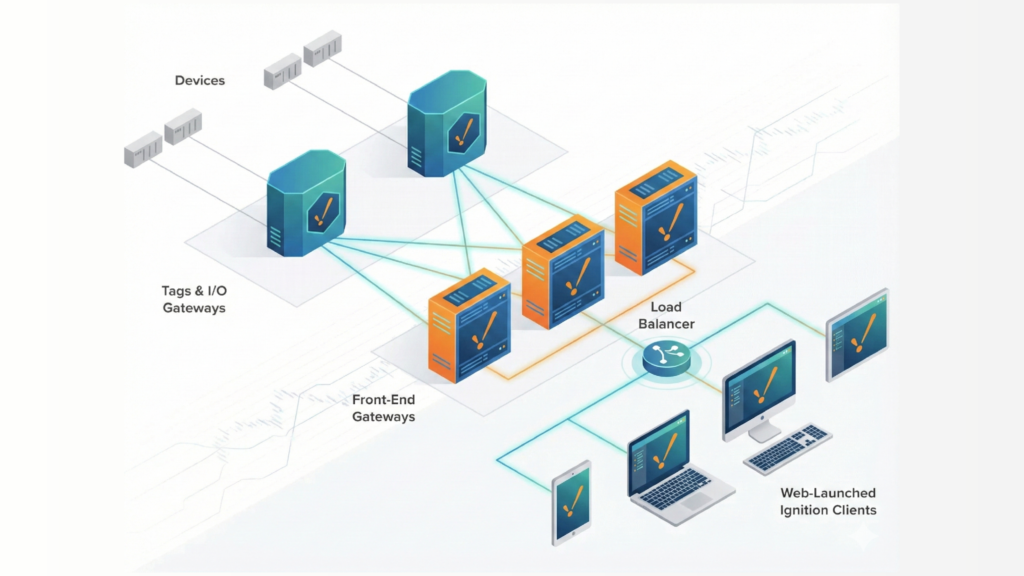
Purpose: The main goal of a load balancer is to evenly distribute incoming requests among multiple servers. This helps ensure that no single server gets overwhelmed. For example, if your website receives 1,000 requests every second, but one server can only handle 500. Then, by using a load balancer to send requests to two servers to solve this issue.
How it works: When someone visits your website or app and makes a request, the load balancer chooses which server will handle that request. It can do this based on different methods. Such as sending requests to each server one after the other, directing requests to the server that currently has the least amount of work, or consistently directing related requests to the same server.
Benefits: Using a load balancer offers several advantages:
It increases availability because if one server stops working, the rest can still manage the traffic.
It boosts performance by spreading the workload evenly.
Also, it allows for easy growth since you can add more servers without needing to change anything for your users.
Placement: Load balancers are typically positioned between users and the application servers they access, as well as between those application servers and the databases they rely on.
Complete System Design Architecture with Load Balancing, Caching, and Databases
3.2 Caching
Caching is used to store frequently used data in fast, temporary memory. This helps reduce response time and lowers the load on the database. Caches are much faster than databases because they store data in RAM instead of disk. Because of this, caches can be 100 to 1,000 times faster than disk-based databases.
Types of Caching
There are different types of caching used in systems.
Client-side caching happens in the browser. Browsers store HTTP responses so the same data does not need to be downloaded again.
Server-side caching stores frequently used data in memory on the server. This allows the application to quickly return data without calling the database.
Database caching stores the results of common database queries so the database does not need to recompute them every time.
CDN caching stores static files like images, CSS, and JavaScript at servers around the world so users can access them faster.
Caching Example
Imagine a user profile is requested 1,000 times per second.
Without caching, the database is hit 1,000 times every second.With caching, the database is queried only once. The other 999 requests are served from memory.
This reduces database load by 99% and shows how powerful caching is at large scale.
Cache Invalidation Challenge
Caching becomes difficult when data changes. When data is updated, the cache must also be updated or cleared. Common solutions include using expiration times (TTL), updating the cache when data changes, or writing data to the cache at the same time as the database. Cache invalidation is considered one of the hardest problems in computer science because outdated data in cache can show wrong information to users.
3.3 Databases: SQL vs NoSQL Selection
Choosing between SQL and NoSQL databases is very important because it affects how your system works, scales, and stays correct.
SQL (Relational) Databases
SQL databases store data in tables with a fixed structure. The schema is defined in advance and does not change often.
They follow ACID rules, which means data is always correct and safe, even during failures. SQL databases are good for complex queries and relationships between data.
They usually scale vertically by using stronger machines, but can also scale horizontally using replication.
Common SQL databases include PostgreSQL, MySQL, and Oracle.
When to use SQL:Use SQL when data consistency is very important. This includes banking systems, payment systems, complex transactions across multiple tables, stable data models, and detailed reporting. Banks prefer SQL because losing or duplicating money is unacceptable.
NoSQL (Non-Relational) Databases
NoSQL databases store data in flexible formats. The schema can change easily over time.
They are designed to scale horizontally across many servers and are built for high availability. Most NoSQL systems follow eventual consistency, meaning data may be temporarily inconsistent.
NoSQL databases are optimized for specific use cases like fast reads, writes, or large-scale data storage.
Examples include MongoDB (document-based), Cassandra (column-based), and Redis (key-value).
When to use NoSQL:Use NoSQL for social media feeds, real-time analytics, IoT systems generating huge data, caching, session storage, and applications that can tolerate small delays in consistency. Twitter uses NoSQL because short-term inconsistency between servers is acceptable.
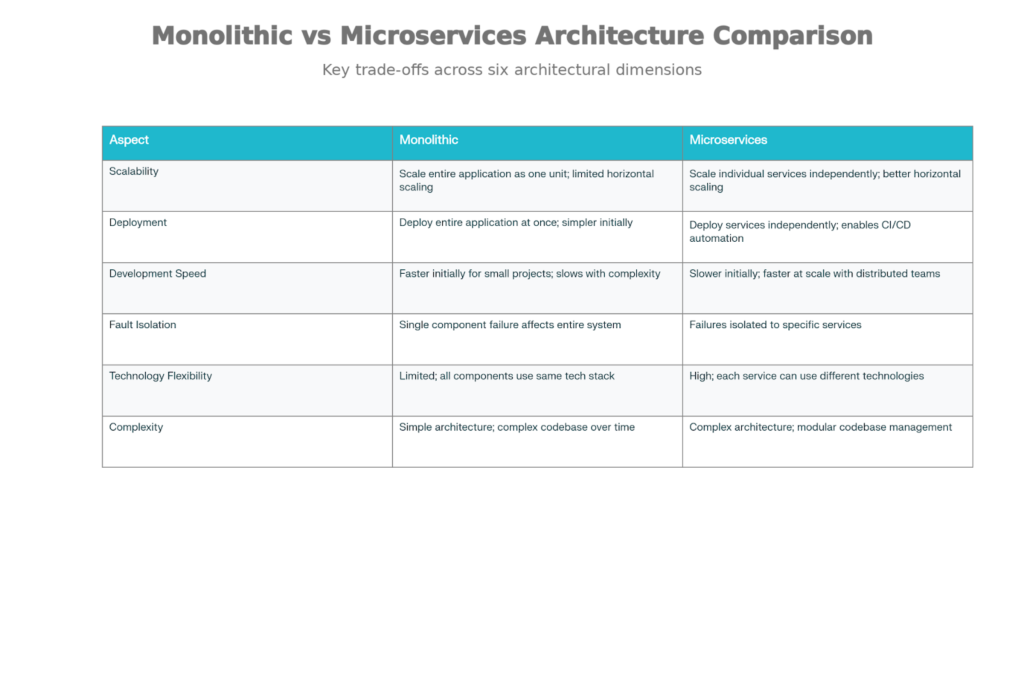
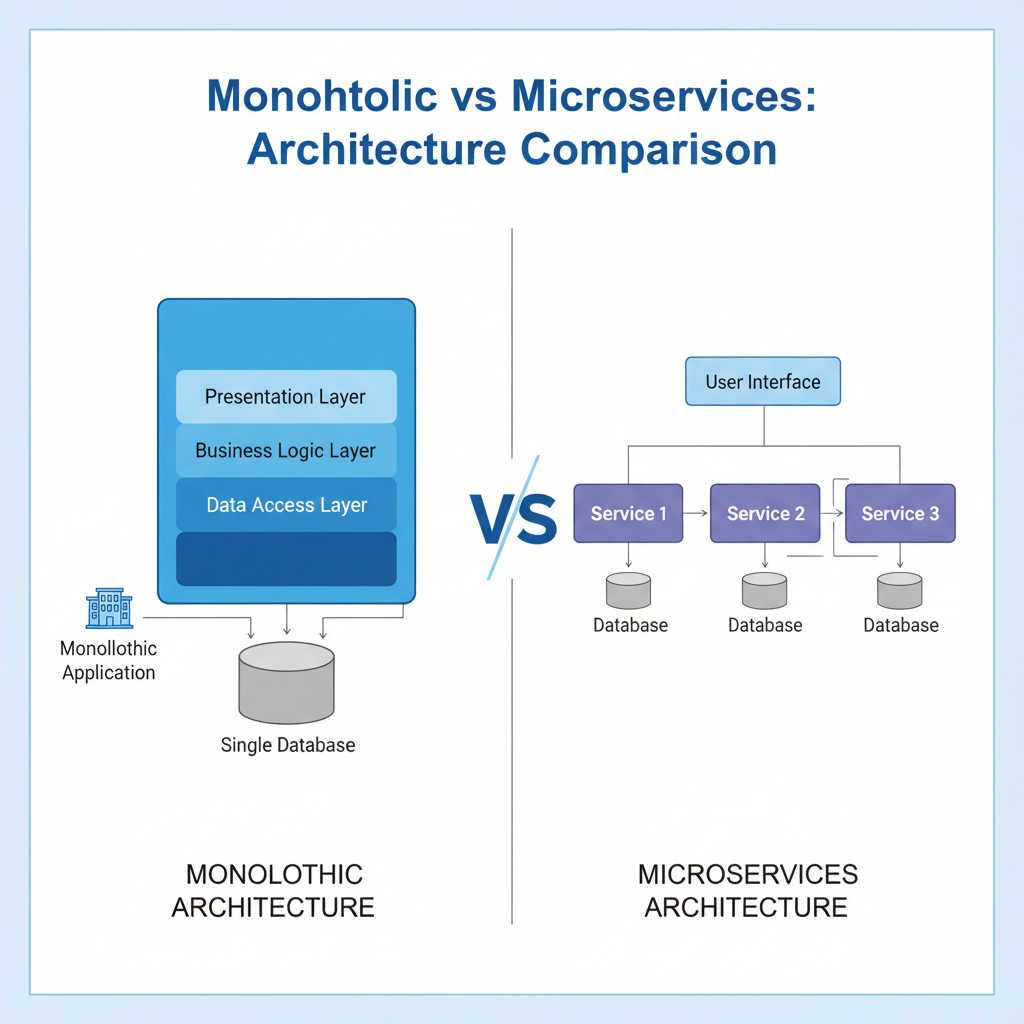
Monolithic vs Microservices Architecture Comparison
3.4 Database Sharding
Sharding means breaking a big database into smaller parts and storing them on different servers. This makes the system faster and helps it handle more users.
Why we do it:Instead of one server doing all the work, many servers share the load.
Sharding Types:
Range-based sharding:
Data is split by ID ranges (like users 1–1M on server 1, 1M–2M on server 2).
It is easy to use, but one server can get too much data if IDs are not balanced.
Hash-based sharding:
A hash function decides which server stores the data.
This spreads data evenly, but makes searching by range harder.
Directory-based sharding:
A separate table tells which data is on which server.
It is flexible, but more complex and risky if that table fails.
Consistent Hashing:
It helps reduce data movement when adding or removing servers.
Without it, adding one server may move half the data.
With it, only a small part of data moves.
Main Problems:
Queries across multiple servers are harder
Joining data from different shards is complex
Planning sharding properly is very important
Database Sharding Strategy for Horizontal Scaling
3.5 Message Queues and Asynchronous Processing
A message queue helps different parts of a system work independently. Slow work is done later, not while the user is waiting.
How it works:
One service puts a message in the queue.
Another service picks it up and processes it later.
Where it is used:
Send emails after user signup
Process image uploads in the background
Collect logs from many servers
Share events using publish–subscribe
Examples:
RabbitMQ
Apache Kafka
AWS SQS
Benefits:
Faster response: user gets reply immediately
More reliable: messages are not lost if a worker fails
Easy scaling: add more workers to process messages faster
3.6 Content Delivery Networks (CDNs)
Purpose:
A CDN delivers images, videos, CSS, and JS from servers that are close to the user. This makes websites load faster.
Why is it needed:
If all users download data from one server in the US, it is slow and costly.
CDNs store copies of content in many countries.
How it works:
User requests a file
CDN sends it from the nearest edge server
If the file is not there, CDN gets it from the main server and saves it
Next users get it directly from the nearby server
Impact:
A user in India gets content from an Indian server instead of the US.
This reduces the delay a lot and makes the site feel fast.
Faster sites mean happier users and more conversions.
Popular CDN examples:
Cloudflare
Akamai
AWS CloudFront
3.7 API Design and REST Principles
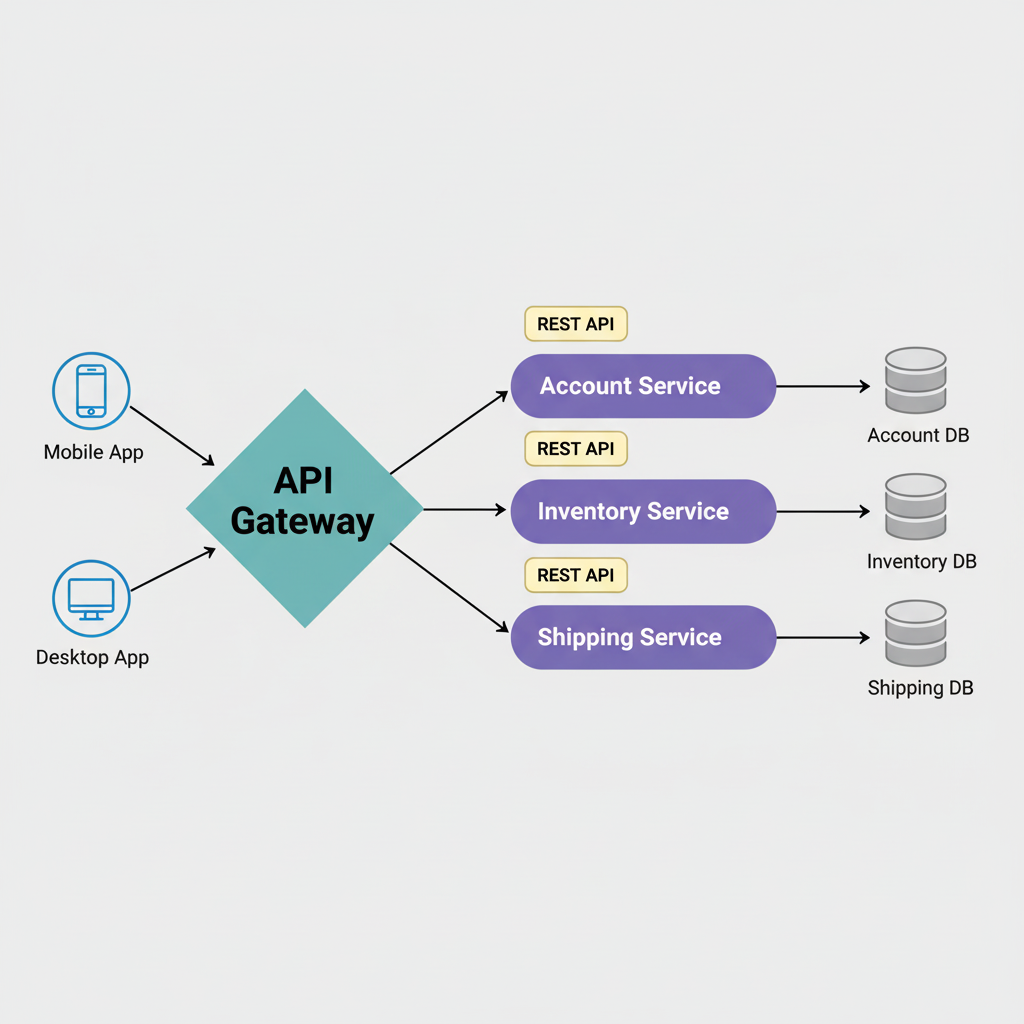
API Gateway: Acts as single entry point for all clients, handling routing, authentication, rate limiting, and protocol translation. This prevents each service from reimplementing cross-cutting concerns.
RESTful API Design Principles:
Resource-Based Architecture: Model URLs around nouns (resources), not verbs
Correct: POST /users, GET /users/123, DELETE /users/123
Incorrect: POST /createUser, GET /getUser, POST /deleteUser
Statelessness: Each request contains all information needed to process it. Server doesn't store session state between requests. This enables horizontal scaling of servers without session affinity.
Uniform Interface: Consistent use of HTTP methods:
GET: Retrieve resource (safe, idempotent)
POST: Create new resource
PUT: Update existing resource (idempotent)
DELETE: Remove resource (idempotent)
Client-Server Separation: Client and server are independent. Changes to server don't require client changes.
Layered System: Clients interact through intermediaries (load balancers, API gateways) without knowing the backend structure.
Cacheability: Responses should indicate if they're cacheable for optimization.
4. Architectural Patterns
Different patterns suit different requirements. Choosing the right pattern is foundational to system design success.
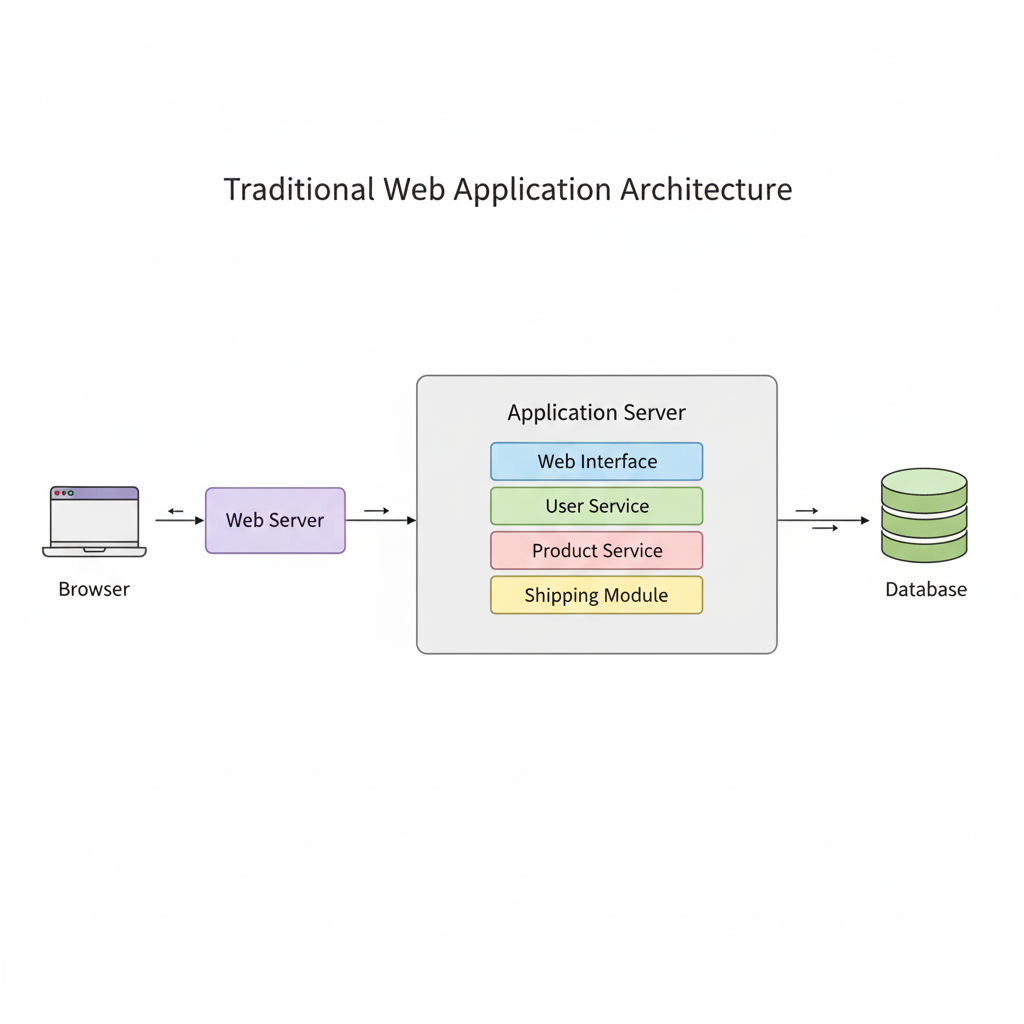
4.1 Monolithic Architecture
What it is:All parts of the app (UI, logic, database code) are in one single application.
When to use:
Small apps or MVPs
Small teams
When you want to build fast and keep things simple
Advantages:
Easy to build and deploy
Easy to debug and test
Fast performance (no network calls)
Simple setup: one app, one database
Disadvantages:
Hard to scale when users grow
Code becomes big and slow to change
One bug can break the whole app
Hard to use new technologies later
4.2 Microservices Architecture
Monolithic vs Microservices Architecture
What it is:
The app is broken into many small services.
Each service works independently and can be deployed alone.
When to use:
Large and complex systems
Multiple teams working together
Apps with very high traffic
Companies like Netflix, Uber, and Amazon
Advantages:
Scale only the service that needs more power
Teams can work independently
Each service can use different technology
One service failure does not crash the whole system
Disadvantages:
System is harder to manage
Network calls are slower than local calls
Data consistency is difficult
Needs good monitoring and DevOps tools
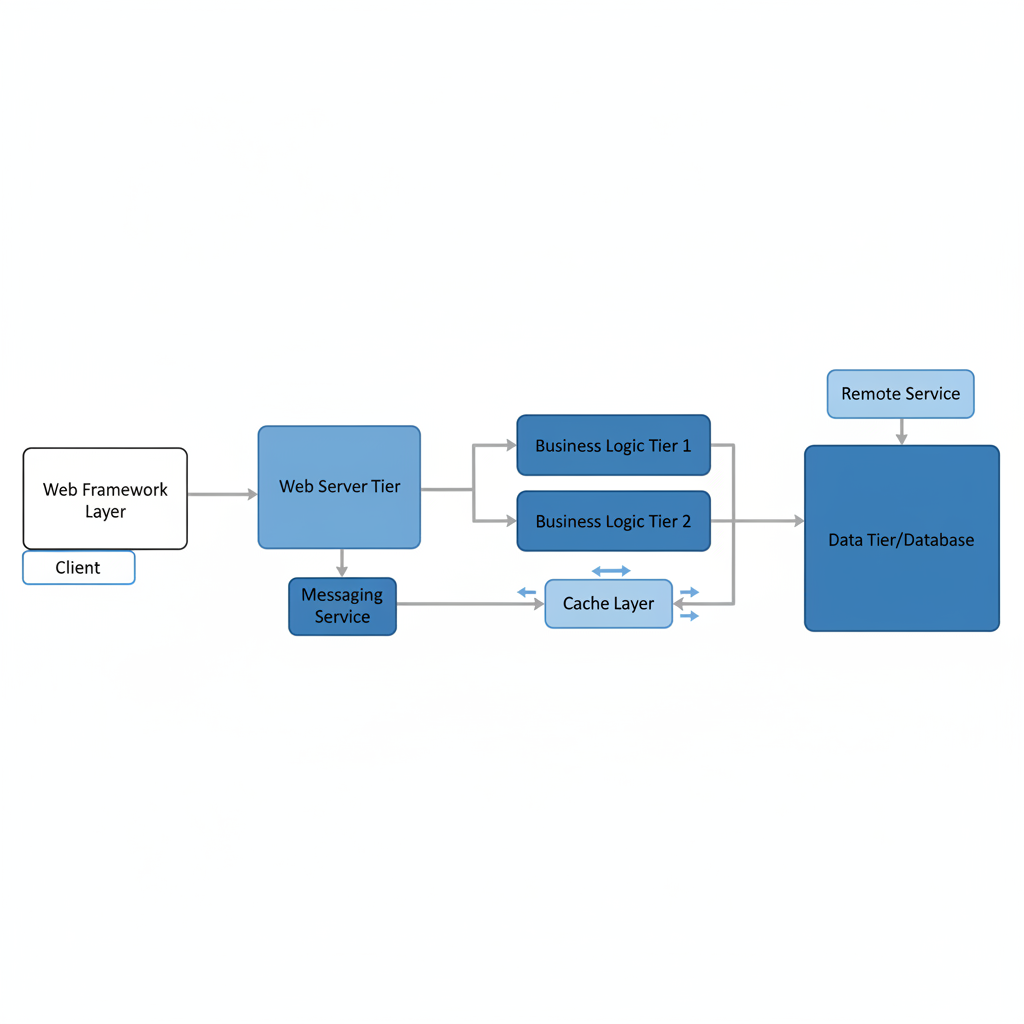
4.3 Layered (N-Tier) Architecture
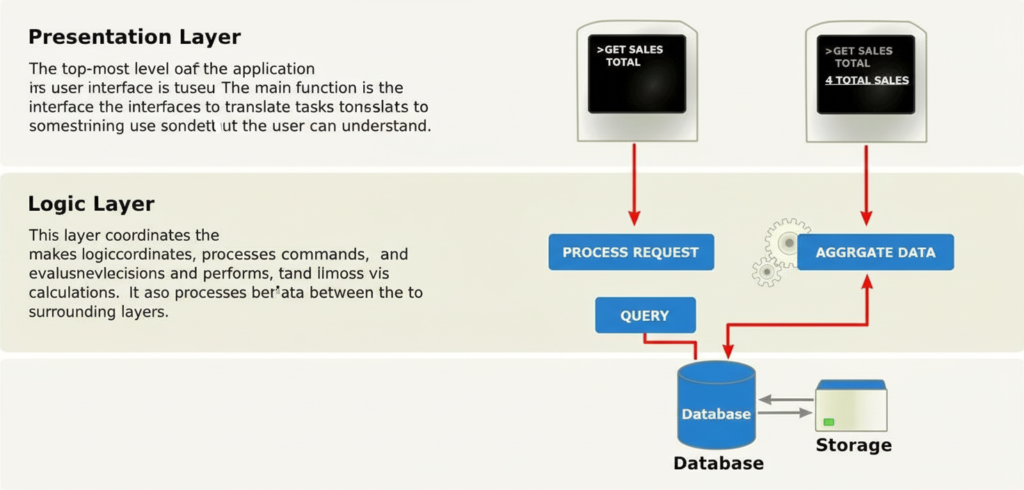
What it is:The app is divided into layers, each with a clear job.
Main layers:
Presentation layer: UI and APIs
Business layer: application logic
Persistence layer: database access
Database layer: stores data
Advantages:
Easy to understand
Clean separation of responsibilities
Good for learning and simple apps
Disadvantages:
Can grow into a monolith
Hard to scale only one layer
5. Real-World Example: Designing a URL Shortener
Let's apply these concepts to design a URL Shortening Service (like Bitly or TinyURL).
5.1 Requirements
What the system should do (Functional):
User gives a long URL and gets a short URL
When someone opens the short URL, it redirects fast
User can choose a custom name (optional)
Short URL can expire after some time (optional)
System expectations (Non-Functional):
Create 1 million short URLs every day
Handle 100 million redirects every day
Response time should be under 50 ms
System should be available 99.99% of the time
URLs should work for many years
No two short URLs should be the same
5.2 Data Estimation
Short URL size:
7–8 characters are enough using letters and numbers
Storage per URL:
Short code + long URL + extra info ≈ 200 bytes
5 years storage:
Around 365 GB, which is manageable
Traffic:
About 1,157 requests per second, mostly redirects (reads)
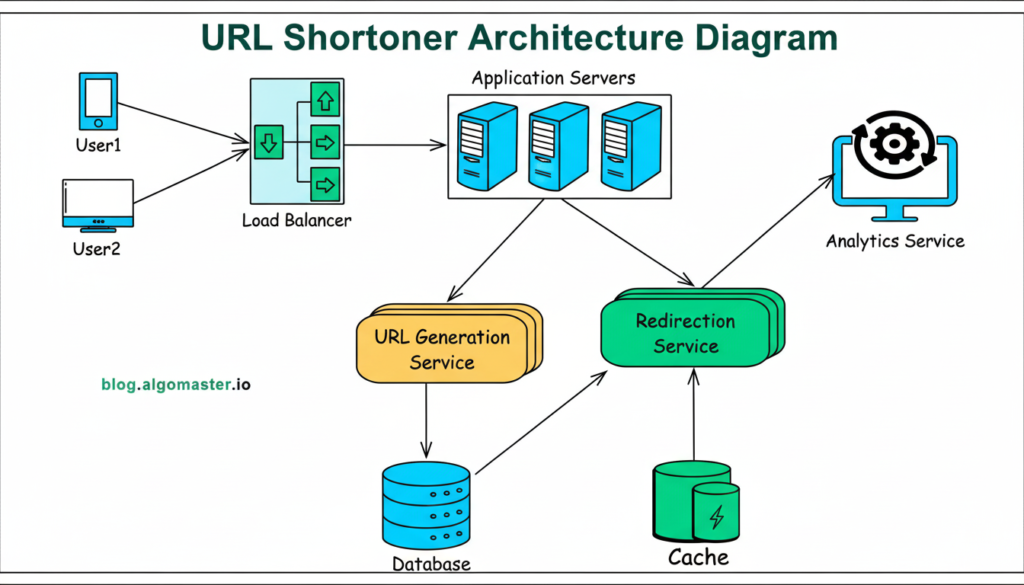
URL Shortener Service (creates and redirects URLs)
Database (stores URL data)
Cache (stores popular URLs)
Analytics (optional tracking)
5.4 API Design
Create short URL:
POST /api/v1/urls/shorten
Input: long URL
Output: short URL and short code
Redirect:
GET /api/v1/urls/{shortCode}
Redirects user to original URL
5.5 Database Design
Table: URLMapping
id → unique ID
shortCode → short URL key
longUrl → original URL
userId → owner (optional)
createdAt → creation time
expiresAt → expiry time (optional)
Why this works:
Fast search using a short code
Easy to manage users and data
Works well with PostgreSQL
5.6 Scalability
For creating URLs:
Try fast hash first
If a duplicate is found, use the counter
Limit requests per user
For redirects (most traffic):
Cache popular URLs in Redis
Use database read replicas
Warm cache for trending links
Future growth:
Start with one database
Later, split the data into shards when traffic increases.
6. System Design Best Practices and Principles
6.1 Key Principles of System Design
The SOLID principles were originally developed for object-oriented programming, but they also apply to designing complex systems. Here’s a simple breakdown:
Single Responsibility: Each service in a system should have one main job or purpose. This way, if something needs to change, it’s clear where to make that change.
Open/Closed: Systems should be designed so they can be expanded with new features without needing to change existing code.
Liskov Substitution: If you have different parts of a system, they should be interchangeable. For example, if you have a service for handling payments, you should be able to replace it with another payment service without breaking the system.
Interface Segregation: Instead of creating one large interface for communication, it’s better to have many smaller, specific interfaces. This makes it easier for different parts of the system to interact.
Dependency Inversion: Rather than relying on specific implementations, systems should depend on abstract concepts. This simplifies making changes in the future.
6.2 Modularity and Loose Coupling
When designing systems, aim for components that operate independently. This means they should have minimal connections and should communicate through clearly defined methods, like APIs. Developing and updating these components should be straightforward. For example, instead of having the order processing system directly request payment from the payment system, it could send out a "Payment Needed" notification. The payment service can then react to that notification independently.
6.3 Handling Failures and Building Resilience
Since failures are inevitable, it's smart to design systems to handle them well.
Graceful Degradation: This means that even if some parts of the system fail, others should still work, allowing the system to function partially.
Circuit Breaker Pattern: If a service is repeatedly failing, this approach stops calling it temporarily, preventing further issues, and tries again later.
Timeouts: Instead of hanging indefinitely for a response, the system should set time limits for waiting, so it can move on if something's wrong.
Retry Logic: This involves automatically trying again when an operation fails, with an increasing delay to give the service time to recover.
Health Checks: Regularly checking on the health of components ensures you know what’s working and what isn’t.
Bulkheads: This strategy keeps resources separate so that a problem in one area doesn’t spill over and cause issues in another.
6.4 Monitoring and Observability
To effectively manage a system, it’s crucial to have visibility into its performance. Implement the following:
Metrics: Track important data like CPU usage, memory load, response times, and error rates.
Logging: Use structured logs for easier troubleshooting.
Tracing: Follow the path of requests as they move through different services.
Alerting: Set up notifications to warn you if something goes wrong.
By focusing on these principles and practices, you can build robust systems that are easier to manage and less prone to failure.
7. Common System Design Mistakes
Here are some common mistakes to avoid when developing your project:
Building Too Much Too Soon: Don’t create a complex system before you know if your basic idea works. Start simple and only add features later.
Ignoring Important Trade-offs: Don’t assume you can achieve perfect performance, availability, and reliability all at once. You often have to give up one to improve another.
Optimizing Too Soon: Focus on fixing clear problems in your system instead of trying to make everything perfect from the start.
Having Weak Points: Make sure your project can handle failures. If one part goes down, have backups ready to keep things running smoothly.
Lack of Monitoring: Keep an eye on your project once it’s in use. Without proper monitoring, you might miss important issues.
Too Many Dependencies: If one part of your project relies heavily on another, a change in one could break the others. Aim for more independence between parts.
Overlooking Network Issues: Don’t assume everything will always run perfectly on the internet. Be prepared for potential network problems.
Data Consistency Concerns: Be careful with how you manage data, especially for critical areas like finance. Make sure your systems provide accurate and reliable information.
By avoiding these pitfalls, you’ll have a better chance of developing a successful project.
Conclusion
Mastering system design means finding the right balance between scalability, reliability, and performance. You need to understand the basics, make smart trade-offs, and choose the right architecture for your needs. Every decision affects how well your system works. By following a clear design process, using key components like load balancers and caching, and following best practices, you can build systems that work well even for millions of users. Start small, improve step by step, and keep monitoring your system. Last of all, good system design comes from strong basics, real-world experience, and smart decision-making.
Prep HQ is more than just a preparation platform, it’s a movement to shape the tech future of our country. Designed specifically for passionate tech enthusiasts, Prep HQ helps you master everything from basics to advanced concepts with ease. We offer step-by-step tutorials, video explanations, mini-guides, real interview questions, salary insights, mock interviews, project ideas, and an active discussion forum, all under one roof. Built by experts.